Stayola: A Festive Typeface That Elevates Holiday Campaigns
Designing a Holiday Teaser with Stayola
While preparing a holiday product teaser for a seasonal candle line, I needed a typeface that would immediately convey warmth, cheer, and whimsy. That’s when I reached for Stayola. As a script font with ornamental touches and a playful personality, it felt like the perfect fit. I dropped it into the main headline of the Instagram post: “Unwrap the Magic.” Right away, the design felt more inviting and visually aligned with the festive tone of the campaign.
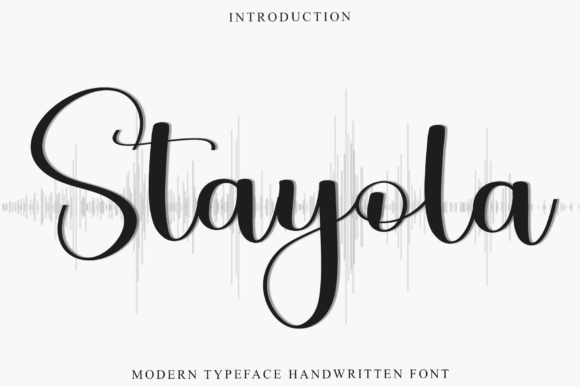
Stayola’s letterforms have a slightly bouncy baseline, with flourishes that mimic hand-drawn elements. It’s not overly structured, which gives it a lighthearted and approachable feel. It's the kind of font you’d expect to see on holiday packaging, greeting cards, or boutique gift tags. But in a digital campaign context, it brings a level of charm that’s hard to replicate with more rigid typefaces.
Performance Across Campaign Assets
I used Stayola across several campaign visuals: a YouTube thumbnail, a Pinterest pin, and a carousel post for Instagram. In each case, the font held up well at larger sizes, especially when used as a decorative headline or logo-style text. The flourishes added visual interest without becoming overwhelming, particularly when paired with a clean sans serif like Montserrat or Lato for supporting text.
On the YouTube thumbnail, where visual clarity is crucial in fast-scrolling feeds, I made sure to use Stayola in a high-contrast color—bright red on a white background. It stood out immediately, and the festive tone aligned perfectly with the video’s holiday unboxing theme. In the Pinterest campaign, the font worked well overlaid on lifestyle images of cozy interiors, giving the pins a curated, boutique-like aesthetic.
Readability and Mobile Optimization
One thing I kept in mind when using Stayola was readability. Because of its decorative nature, it’s best suited for short headlines, callouts, or display text. Using it for body copy or long captions would compromise legibility, especially on mobile screens. When previewing the Instagram post on a phone, I noticed that the flourishes on letters like “g” and “y” could blend into the background if not spaced properly.
To counter this, I adjusted the tracking slightly and made sure the text wasn’t placed over busy image areas. For dark backgrounds, I used a white stroke or drop shadow to ensure contrast. On light backgrounds, a deep green or gold font color kept the holiday theme intact while maintaining visibility.
When Stayola Works Best (And When It Doesn’t)
Stayola shines in campaign moments that are short, visual, and emotionally driven. It’s ideal for:
- Holiday sale announcements
- Instagram story headers
- Pinterest quote graphics
- YouTube thumbnails for seasonal content
- Email banners for festive promotions
However, it’s not the best choice for:
- Dense product descriptions
- Legal disclaimers or fine print
- Corporate newsletters or formal announcements
- Small text on digital ads
Its decorative style is a strength in the right context, but can become a liability when clarity and neutrality are needed.
Font Pairing and Practical Design Tips
Pairing Stayola with a clean sans serif font helped balance the overall design. For example, in an email promotion, I used Stayola for the header “Celebrate the Season” and Roboto for the body text. This combination gave the email a festive yet professional feel. I also experimented with pairing it with a serif font for a more elegant twist, which worked well for a luxury gift guide layout.
Before finalizing the designs, I checked the font’s included styles and ligatures. Stayola offers several alternate characters and swashes, which allowed for slight customization and helped avoid repetition across multiple assets. I also verified that it supports multilingual characters and comes with commercial licensing, which is essential when using fonts in client campaigns or branded templates.
From a workflow perspective, having the font in both OTF and TTF formats made it easy to use across different design tools—from Photoshop to Canva. If you’re planning to use Stayola in a digital product like a template pack or design asset bundle, always double-check the licensing terms to ensure it’s permissible for resale or commercial use.